Practice drawing with AR overlays and guided lessons on Android phone
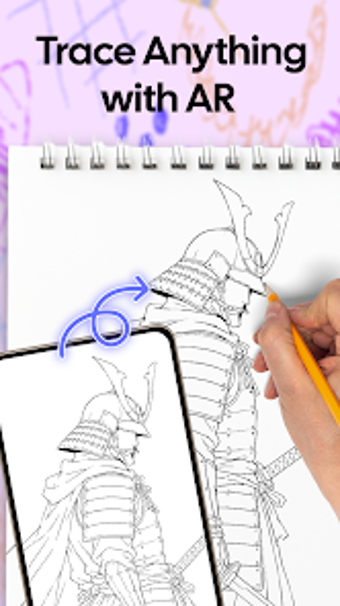
WildRose - AR Draw & Sketch from MinhThao helps bridge digital reference and hands-on drawing practice by placing images over a camera feed. The app projects semi-transparent overlays for paper tracing and also offers a digital canvas for finger or stylus sketching. It bundles categorized templates, adjustable opacity, step-by-step tutorials, and in-app storage. Designed for beginner artists, students, and hobbyists who want structured practice and measurable line-accuracy improvements.
It turns your camera into a live tracing guide
WildRose projects semi-transparent reference images onto the device camera so users can trace outlines on paper while watching the live feed. The workflow expects the device to sit above the paper, and the app includes an integrated flashlight to support low-light sessions. Opacity control helps users choose how bold the reference appears, which adjusts the visible guide while tracing by hand.
Works with your phone gallery and local storage
The tool runs on Android and requests Camera and Storage/Media permissions to import and save images. You can convert personal photos into tracing guides by importing from the device gallery or capturing new pictures. Completed sketches and templates are kept in the app's local storage area, letting users keep a personal library of favourites without requiring external services.
Built for learners who prefer stepwise practice
Instructional material sits alongside ready-made templates organized into themes like animals, anime, nature, and food, offering clear progression for novices. The digital canvas accepts finger or stylus input and records the drawing process as video, which helps users review incremental improvements. Favourite templates and in-app storage let beginners return to the same lessons for repeated practice.
Privacy posture and community maturity
The app explicitly needs camera access to deliver augmented overlays and storage access to handle imports and saved sketches, which are kept on the device. The developer is building the user base, and the project has not yet accumulated a large volume of public reviews, so public community resources and peer feedback remain limited compared with longer-established creative apps.
To sum up, a solid practice tool for solo learners with a modest community
To sum up, WildRose is a practical option for hobbyists and beginners who want focused, hands-on sketch practice and personal progress tracking; it is less suitable for creators seeking a large peer community or extensive public feedback because the app is still building its audience. Pro tip: set brief daily practice slots and review recorded sessions to track steady improvement.